Sergey Diakov
● Developer tool Cursor just dropped version 2.0, and according to Dan Shipper, it's built for a different kind of programming — one where you're managing AI agents more than writing code yourself. The team at @every spent a week testing it and called it "a solid evolution of the IDE experience for 2025."
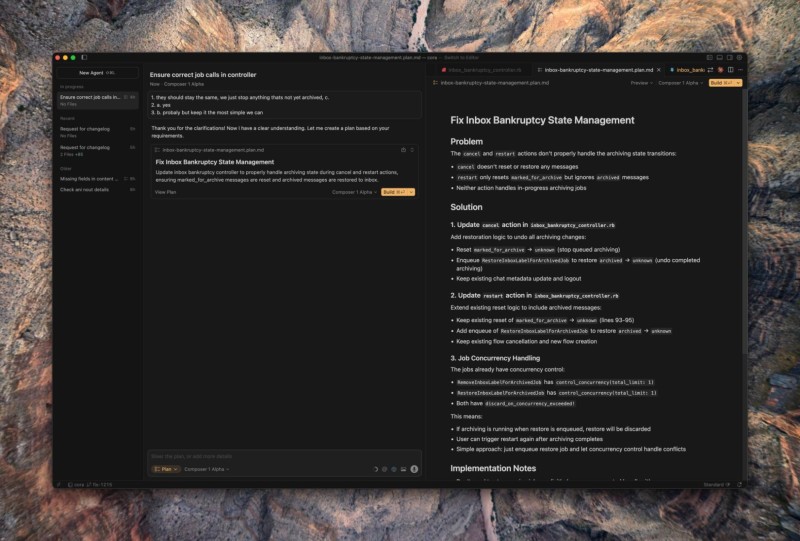
● The biggest change is the new Agent View. It works like an inbox: a left sidebar shows you which AI agents are working, what needs your approval, and what's already done. It feels like a productivity app, but for coding.
● The catch? It can be a lot to take in. The testing revealed it can feel "overwhelming" at times with so many automation options. If you're used to working in a terminal, the adjustment might be rough. And if agents start piling up tasks without clear management, things could get messy fast.
● This puts Cursor in a stronger position against competitors like GitHub Copilot and Replit. The new Composer 1 Alpha model is fast and runs autonomously, which could cut down on tedious coding and review work. For startups, that means shipping faster and spending less on development. But if you want full control over your code, traditional IDEs or hybrid setups are still solid options.
● Cursor 2.0 doesn't just change the interface — it lets you run multiple AI models on the same problem, compare their results, and test code live in an integrated Chrome browser. It's all happening in one place: writing, testing, and reviewing. This feels like the beginning of development environments that run themselves, and it could change how we build software by 2026.
 Sergey Diakov